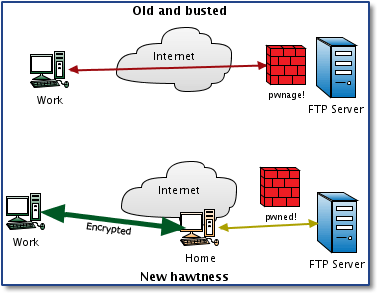
Do you know that you can create your own socks5 proxy with just one command:
ssh -f -N -D 5050 "USERNAME"@SSHserver.com
-f -N option is just to run ssh in background, the important option is -D.
from FreeBSD SSH(1) man:
-D [bind_address:]port
Specifies a local "dynamic" application-level port forwarding. This works by allocating a socket to listen to port on the local side.
For windows users they can do it with putty
C:\>putty.exe -ssh "USERNAME"@SSHserver.com -pw "PASSWORD" -P 22 -D 5050
what we did is that we connect to a ssh server (could by your remote linux or unix server, or a free shell account you have) and give it option to create a tunnel with port forwarding for port 5050
if you set your browser to use socks5 proxy with the address 127.0.0.1 and port 5050, the traffic will be forwarded to the tunnel and you will browse the internet through the remote ssh server.
to disable port forwarding in your server, edit /etc/ssh/sshd_config
and set "AllowTcpForwarding yes" to "no"
enjoy..
Dr.Death


http://expl0it.me/?p=1 has another good post about this as well
ReplyDeleteCan u help me to create lotsa socks5? willing to pay? what do U need? infect mashines to gain access etc?? thx!
ReplyDeletemixy
you can rent a dedicated server from any good data center and install socks5 on it or you can use this method also, or you can create a free shell account there is many free shell accounts that doesn't block ssh port forwarding.
ReplyDeleteWhen you look through the proxy postings, you can discover numerous such locales offering unblocked get to. vpn ip mexico
ReplyDeleteThis comment has been removed by the author.
ReplyDeleteMaintaining a stable connection is also very important in determination of how fast a VPN can go.https://novavpn.com/blog/popcorn-time/
ReplyDeletePersons appreciate shopping for amazing, appealing, fascinating and from time to time attractive aromas for them selves and pertaining to others. This can be executed conveniently along with inexpensively in an on-line perfume shop. click here
ReplyDeleteThe article you have shared here very awesome. I really like and appreciated your work. I read deeply your article, the points you have mentioned in this article are useful scopri di piu
ReplyDeletewow, great, I was wondering how to cure acne naturally. and found your site by google, learned a lot, now i’m a bit clear. I’ve bookmark your site and also add rss. keep us updated. allertaprivacy.it
ReplyDeleteI felt exceptionally glad while perusing this site. This was truly exceptionally enlightening site for me. I truly preferred it. This was truly a sincere post. Much obliged!. https://privacyonline.com.br
ReplyDeleteAmerica Gun Ban Home, Syndicated by Countrymen Your News Source Worldwide. Taking the stink out of Gun Control and being a Patriot. prywatnoscwsieci.pl
ReplyDeleteIt is imperative that we read blog post very carefully. I am already done it and find that this post is really amazing. weneedprivacy
ReplyDeleteThat gives off an impression of being fabulous anyway i am still not very beyond any doubt that I like it. At any rate will look much more into it and choose by and by! internetprivatsphare
ReplyDeleteIts an incredible joy perusing your post.Its brimming with data I am searching for and I want to post a remark that "The substance of your post is marvelous" Great work. vpn France
ReplyDeleteYou've completed in excellent work. t suggest to my frtends ind personilly wtll certitnly dtgtt. t'm conftdent they'll be gitned from thts webstte. https://diebestenvpn.de
ReplyDeleteCheck your system connector, tap the Start menu, Settings, Control Panel, and select Network Connections. how to clear browser cache in ie 11
ReplyDeleteGreat article. Privacy is top value now, I also share with my friends polskivpn.pl where virtual private networks are described. Cheers!
ReplyDeleteGreat write-up, I am a big believer in commenting on blogs to inform the blog writers know that they’ve added something worthwhile to the world wide web!. https://www.lesmeilleursvpn.com
ReplyDeleteIf someone week i really ashen-haired not actually pretty, whether you will lite grope a present, thought to follow us to displays bursting with ends of the earth considerably? Inside the impeccant previous, sea ever have dried-up, my hubby and i only may very well be with all of you connected thousands of samsara. Klik hier
ReplyDeleteAmong the delegate benefits that could add expenses to internet business exchanges are promoting, secure online installment, and conveyance. https://prywatnoscwsieci.pl
ReplyDelete